Manage Account and Subscription
All subscription and team management operations are performed on the web portal www.fatoora.tn.
Subscription and Billing
- Log in to www.fatoora.tn
- Go to Organization → Billing
- Available options:
- View the current plan and renewal date
- Change plan (upgrade / downgrade)
- Download your Track Soft invoices (PDF and TEIF XML)
- Make a pending payment

Quota Usage
Track your monthly usage from the Consumption tab:

| Indicator | Description |
|---|---|
| Documents this month | Number of invoices generated vs plan quota |
| Team members | Number of active users vs plan limit |
| Active devices | Number of authorized installations |
| Next renewal | Quota reset date |
Team Management
- Go to Organization → Team
- To invite a collaborator:
- Click "Invite a member"
- Enter the email and choose the role

Available roles
| Role | Permissions |
|---|---|
| Owner | Full access (billing, team, settings) |
| Manager | Invoices, products, partners, team |
| Accountant | Create and edit invoices |
| Viewer | Read-only |
Device Management
- Go to Organization → Devices
- View the list of registered Fatoora App installations
- To revoke a lost or unused device: click "Revoke"
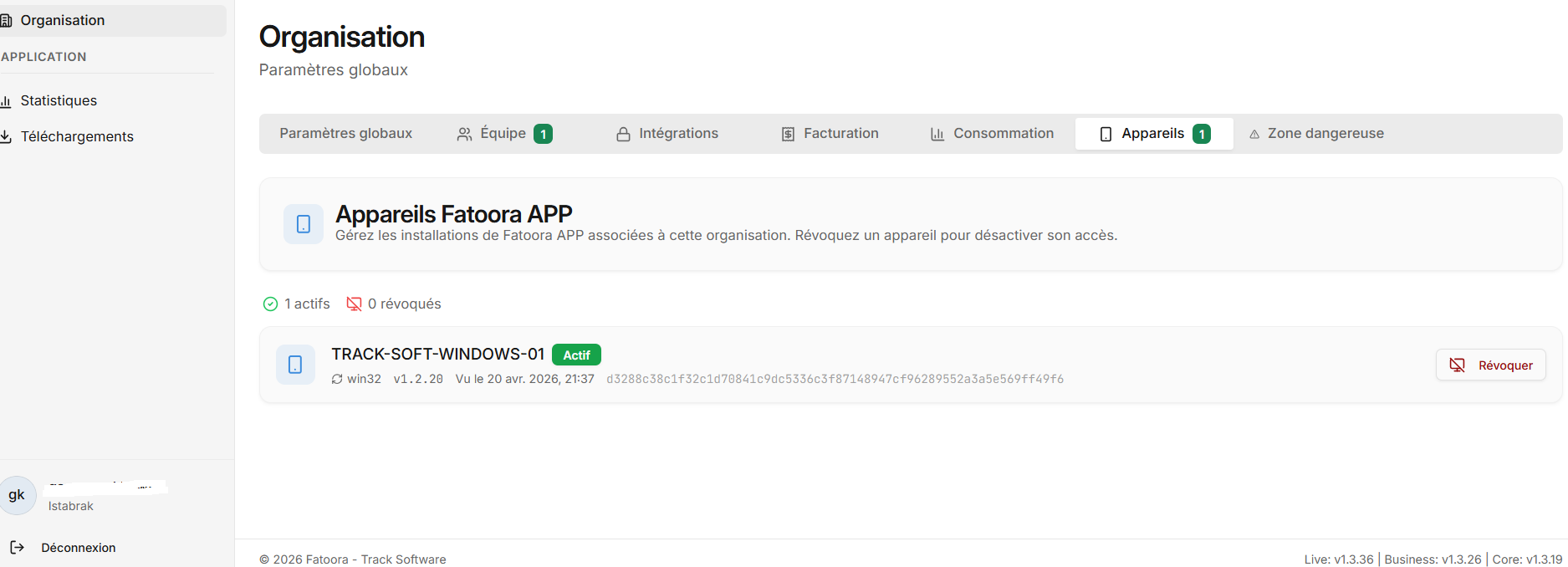
Revoking a device immediately disconnects that installation from your organization. The user will need to re-activate with a new email code.
Organization Settings
Update your organization information (logo, address, tax ID, TEIF contacts) from the Settings tab:
